


Whether you’re creating video content or analysing complex data, you can customise your screen space with the Easy Setting Box feature. Arrange multiple displays in various positions and sizes to optimise your workspace. This height-adjustable monitor can swivel, pivot, and tilt to offer the best viewing experience from almost any angle—the perfect tool for collaborative projects or when you need to share your screen with colleagues and clients. Connecting with other devices is made simpler with USB Type-C connectivity, and you can set up a conference meeting with multiple screens using the handy Daisy Chain feature. For your viewing comfort, Eye Saver Mode and Flicker Free technology can help reduce fatigue and tiredness so you can continue working on your projects and tasks.
Enhance your work desk with this WQHD monitor from Samsung and enjoy a smoother workflow.
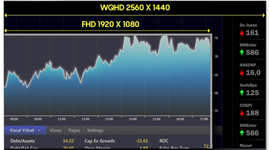
High-resolution WQHD display
Combining a high resolution display with a wide screen, this WQHD monitor provides more space for documents, windows, and programs. With more pixels than Full HD, you can enjoy greater clarity and sharper details.
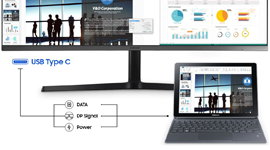
USB Type-C connectivity
Enjoy an efficient workflow thanks to USB Type-C connectivity. With a single cable, you can charge devices, transfer data at high speeds, and connect with most modern devices without the need for multiple adaptors.
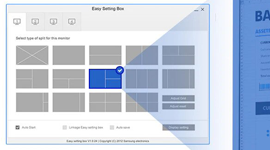
Easy Setting Box
The Easy Setting Box feature allows you to partition, arrange, and customise your display. You can show multiple programs or windows at the same time and optimise how it is displayed depending on your needs.

Eye Saver Mode with Flicker Free technology
Eye Saver Mode offers a more comfortable experience by minimising blue light, while Flicker Free technology reduces strain and irritation on your eyes.