

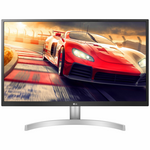
• LG 24 Inch Full HD TN Monitor 24GL600F

    LG 24 Inch IPS Full HD HDMI Monitor 24MK430H-B hero image
    LG 24 Inch IPS Full HD HDMI Monitor 24MK430H-B
    4.5 from 152 reviews
    • Overview
    • Specifications & manuals
    • Reviews
    • Legendary service
    • Delivery, services & returns
    • Questions & answers

    Overview

    Take your gaming experience to the next level with the LG 24 Inch Full HD TN Monitor.

    Be part of the action thanks to a host of viewing modes and features that are designed with gamers in mind. You can always be ahead of the game with the help of Dynamic Action Sync to ensure you’re perfectly in time with the action. This monitor has a 144Hz refresh rate, and in tandem with the Motion Blur Reduction mode, delivers an ultra-smooth and super-clear viewing experience.

    Whether you enjoy role-playing games or shoot-em-ups, this gaming monitor from LG offers a truly immersive gaming experience for hours of gameplay.

    Dynamic Action Sync

    When it comes to gaming, even a millisecond can be the difference between winning or losing. This monitor prevents processing delay thanks to the Dynamic Action Sync feature. This means you can react in real-time during action where every second counts.
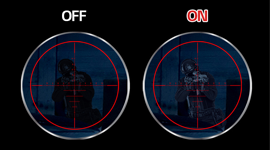
    Black Stabiliser mode

    Reduce squinting and poor visibility during dark scenes with the help of Black Stabiliser mode. This feature can detect dark areas of the screen and brighten those sections so you are not playing blindly in the dark.
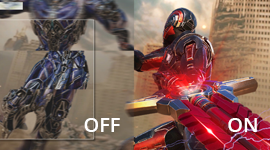
    Radeon Freesync

    Radeon Freesync delivers a smoother gaming experience by minimising stuttering even when playing the most demanding video games.

    Motion Blur Reduction mode

    Enjoy clarity and precision with Motion Blur Reduction. This reduces ghosting and blurring to immerse you in the in-game action.


    Specifications & manuals

    key Specifications
    Brand
    LG
    Finish Colour
    Black
    Height (mm)
    333.8 mm
    Width (mm)
    5568 mm
    Depth (mm)
    61.1 mm
    Model Number
    24GL600F
    Weight (kg)
    3.2 kg
    warranty
    Manufacturer Warranty
    3 Years
    Use
    Not intended or designed for commercial use.
    display
    Refresh Rate
    144 Hz
    Screen Technology
    Twisted Nematic
    Screen Size
    24 in
    HD Type
    Full HD
    Lighting Technology
    Back Lit
    Brightness
    300
    Energy Consumption Calculator
    According to the Standard Test, this product utilises $27.55 of energy.
    inputs
    HDMI Ports (IN)
    2
    HDMI Version
    1.4
    outputs
    Headphone Out
    additional Dimensions
    Height with Stand
    419.8 mm
    Width with Stand
    556.8 mm
    Depth with Stand
    180.6 mm
    Weight with Stand
    3.7 kg
    VESA Mount
    100 x 100 mm
    energy Efficiency
    Energy Consumption(kWh/annum)
    95

    Reviews

    Rating snapshot

    5
    92
    4
    23
    3
    10
    2
    6
    1
    11

    Average customer rating

    Overall
    4.3

    Appliances Online's customer reviews are independently managed by Bazaarvoice, ensuring their accuracy and honesty. Vouchers are sometimes offered to verified buyers in exchange for their unbiased review.

    Learn more about Bazaarvoice Authentic Reviews Trust Mark
    Pros
    Cons
    1-3 of 142 reviews
    Eian gariepy2025-11-26
    Good monitor for the price
    Good monitor and the price it the best monitor you can get for the price on a Black Friday deal it come 2 day after I order it and it been good since I have not got to use the 144hz yet but I will soon but it the best monitor if your on a budget just make sure to buy it a a deal
    awan2025-11-20
    my review
    alright for the price but theres no audio which i hate
    Romeo2025-11-19
    It's the best monitor I ever had
    It's affordable and the screen is crisp and clear. Also it's great for gaming.

    Legendary service

    The Appliances Online Net Promoter Score (NPS) is based on feedback from 89,897 people, collected between August 2024 to August 2025. Learn more about the Net Promoter Score (NPS).
    Excellent service
    Julia, Burleigh Waters, Queensland
    This deal was fantastic, the product excellent
    Allan, Gordonvale, QLD
    I am more than impressed
    Samantha, Carringbah, NSW

    Delivery, services & returns

    Appliances Online is all about legendary service. We offer free next business day delivery, free connection, free removal and free recycling, and we even offer Saturday delivery and, in some locations, a Premium Delivery option that allows you to choose your own 2-hour delivery window.

    Questions & answers

    What VESA mounting size fits this monitor? Cardinal95 · 2024-12-12
    Hey there! Thanks for asking. The VESA mounting holes on this LG monitor are a 100mm x 100mm pattern. If you have any additional questions, you can find us on social media @LGUSSupport. We're always eager to help! *Joseph LG Digital Care Team - Joseph, Appliances Online
    How does sound work on the monitor? What speakers would i need to purchase in order to get sound. I have my PS5 connected to it and I’m not sure how to get sound James345544 · 2024-11-13
    Hey James! Thanks for reaching out with your question! Since your 24GN50W-B monitor doesn’t have built-in speakers, you can easily connect external speakers for a better audio experience. Look for speakers that have a compatible audio input, like a 3.5mm jack or optical input, depending on what your monitor supports. Also, be sure to check your PS5 audio settings to ensure the monitor is selected as the audio output device. If you have any other questions or need further assistance, feel free to reach out to us on social media @LGUSSupport with your contact details. We’re always happy to help! ^Anthony 4236458609, Appliances Online
    Can the leg mounting b taken off to use a monitor arm Bober · 2024-09-28
    Hi there Bober! Thank you for your question. To remove the leg mounting for your LG monitor model 24GL600F-B and use a monitor arm, follow these steps: 1. **Prepare the Monitor**: Lay the monitor face down on a flat, cushioned surface to avoid damaging the screen. 2. **Locate the Screw**: Find the screw located at the bottom of the stand base. 3. **Remove the Base**: Turn the screw counterclockwise to release the stand base. Once the base is detached, pull it away from the monitor. 4. **Detach the Stand Body**: If applicable, locate any additional screws or clips securing the stand body to the monitor, and remove these as needed. 5. **Mounting on an Arm**: After removing the stand, you can attach the monitor to a VESA-compatible monitor arm. Feel free to contact social media @LGUSSupport with your contact details if you need more information. ^Anthony 4236458609, Appliances Online
    What is the specific power cable called to plug in? I got this monitor recently and I don't have one. Donk52108 · 2024-08-15
    Hey there. We found the power cable you need for your LG monitor. You can easily purchase EAY62850015 here: https://lgparts.com/products/eay62850015?_pos=1&_sid=d21188c94&_ss=r. For more questions, private message us on social media @LGUSSupport. We're just a DM away! ^David LG Digital Care Team - David, Appliances Online
    I agree to the terms & conditions
    We're here to help 24/7 - for an immediate answer to your question, chat with one of our Live Chat agents below or call us on 1300 000 500 .