

• LG 65 Inch QNED80 4K Smart QNED TV 65QNED80SQA

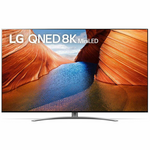
    LG 75 Inch QNED99 8K Smart QNED TV 75QNED99SQB hero image
    LG 75 Inch QNED99 8K Smart QNED TV 75QNED99SQB
    4.1 from 10 reviews
    • Specifications & manuals
    • Reviews
    • Legendary service
    • Delivery, services & returns
    • Questions & answers

    Specifications & manuals

    key Specifications
    Brand
    LG
    Finish Colour
    Black/Silver
    Height (mm)
    839 mm
    Width (mm)
    1452 mm
    Depth (mm)
    44 mm
    Model Number
    65QNED80SQA
    Weight (kg)
    24.5 kg
    warranty
    Manufacturer Warranty
    1 Year
    Use
    Not intended or designed for commercial use.
    display
    Screen Technology
    QNED
    Screen Size
    65 in
    HD Type
    Ultra HD- 4K
    Lighting Technology
    Edge Lit
    Wide Colour Gamut
    Recommended Viewing Distance (cm)
    195 cm
    playback
    High Dynamic Range (HDR)
    Upscaling
    USB File Playback
    smart Home Compatibility
    Google Assistant
    Compatible
    Amazon Alexa Compatible
    AirPlay2
    smart Features
    Operating System
    webOS 22 Smart TV
    Processor
    a7 Gen 5 AI Processor 4K
    FreeView+ Compatibility
    Netflix Compatibility
    Stan Compatibility
    Apps
    Voice Control
    Motion Control
    Streaming Services
    Android App
    iOS App
    Energy Consumption Calculator
    According to the Standard Test, this product utilises $125.57 of energy.
    connectivity
    Bluetooth
    Ethernet
    WiFi
    inputs
    HDCP Version
    2.3
    HDMI Ports (IN)
    4
    HDMI Version
    2.1
    HDMI-eARC
    HDMI-ARC
    HDMI-CEC
    RF Connection In
    USB Ports
    2
    outputs
    Digital Optical Audio Out
    additional Dimensions
    Height with Stand
    906 mm
    Width with Stand
    1452 mm
    Depth with Stand
    295 mm
    Weight with Stand
    24.9 kg
    Package Dimensions (H x W x D)
    970 x 1600 x 172
    Package Weight (kg)
    30.9
    VESA Mount
    300 x 300
    energy Efficiency
    TV Energy Star Rating
    5.0
    Energy Consumption(kWh/annum)
    433
    other Features
    Year
    2022

    Reviews

    Rating snapshot

    5
    125
    4
    24
    3
    6
    2
    1
    1
    4

    Average customer rating

    Overall
    4.7
    Ease of setup
    5.0
    Build quality
    5.0
    Value of product
    4.0

    Appliances Online's customer reviews are independently managed by Bazaarvoice, ensuring their accuracy and honesty. Vouchers are sometimes offered to verified buyers in exchange for their unbiased review.

    Learn more about Bazaarvoice Authentic Reviews Trust Mark
    1-3 of 160 reviews
    Jose77402025-01-12
    Best so far
    [This review was collected as part of a promotion.] I purchased this LG as an upgrade to replace an led model and this one been a mini led, it was a good move, very sharp picture and been a 75 inch model, it looks amazing in my living room.
    Lalaky2024-11-10
    Vibrant colors great picture
    [This review was collected as part of a promotion.] Awesome picture quality color very vibrant. I give it a fort to five star.
    Hal your Pal2024-08-18
    Huge Upgrade!
    Super clear, reliable, and flexible. I can watch sports, movies and videos with perfect clarity and sound. It’s amazing.

    Legendary service

    The Appliances Online Net Promoter Score (NPS) is based on feedback from 89,897 people, collected between August 2024 to August 2025. Learn more about the Net Promoter Score (NPS).
    Excellent service
    Julia, Burleigh Waters, Queensland
    They also removed our old machine with no fuss
    Pam & Warren, Petrie, QLD
    Excellent service
    Yvette, St Kilda, Victoria

    Delivery, services & returns

    Appliances Online is all about legendary service. We offer free next business day delivery, free connection, free removal and free recycling, and we even offer Saturday delivery and, in some locations, a Premium Delivery option that allows you to choose your own 2-hour delivery window.

    Questions & answers

    Does the 2025 new lg QNED evo AI HDMI have Dolby Vision? Dolby Atmos? Which AI processor does it have? Is this tv discontinued?  Juan Dehoyos · 2025-09-26
    Hey there! This model supports Dolby Vision and Dolby Atmos, and uses the α8 AI Processor Gen2. This model is also part of the new 2025 QNED lineup and is not discontinued. If you have additional questions about this TV or anything else LG, let us know on social media @LGUSSupport! ~ Ryan LG Digital Care Team - Ryan, Appliances Online
    Does the 75qned85a have film over the screen or just the frame Tony F 52 · 2025-07-07
    Hi Tony. The LG TV 75QNED85A typically comes with a protective film on the frame or bezel, but not on the actual screen. There's likely no film to remove if there's no visible pull-tab on the screen itself. LG does not apply a peel-off layer directly over the display surface. Remove any labels or stickers around the edges, and your screen is ready. ​​​​​​​​​​​​​​​​​​​​​​For more questions, private message us on social media @LGUSSupport. We're always happy to help! 🙂 ^David LG Digital Care Team - David, Appliances Online
    Hello, for the 75 in (75QNED85UQA), is the width of the legs adjustable, or is it a fixed width like the smaller sizes? AlexVil · 2024-09-17
    Hi there Alex! The stand for this 75QNED85UQA TV has one position, and the stand legs are not adjustable. ^Anthony 4236458609, Appliances Online
    How to remove closed captions from my LG 75 tv screen. Anonymous · 2024-08-19
    Hello, Burt Skinner. The LG 75-inch Class QNED85 UQA series MiniLED 4K UHD Smart webOS 22 w/ ThinQ AI TV, Model # 75QNED85UQA, has a built-in User Guide that you can refer to, to turn off the Closed Captions. Closed captions can only be viewed when the TV station provides closed-captioned programming, and Closed-caption broadcasting is only available for digital/analog broadcasts. On the remote control, press the Settings button (gear icon). Then, on the TV, select Advanced Settings (grey circle with three vertical dots icon) > General > Accessibility > Closed Caption, and set Closed Caption to Off. If you are using a cable service provider for your programming, be sure to turn the Closed Caption option off in the Set-Top box...^Ivan. Ivan, Appliances Online
    I agree to the terms & conditions
    We're here to help 24/7 - for an immediate answer to your question, chat with one of our Live Chat agents below or call us on 1300 000 500 .