
• JBL Wireless On Ear Headphones White JBLT450BTWHT

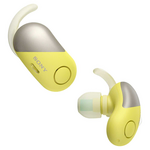
    Sony WFSP700NY Wireless Noise Cancelling Bluetooth In Ear Headphones Yellow hero image
    Sony WFSP700NY Wireless Noise Cancelling Bluetooth In Ear Headphones Yellow
    3.8 from 25 reviews
    • Specifications & manuals
    • Reviews
    • Legendary service
    • Delivery, services & returns
    • Questions & answers

    Specifications & manuals

    key Specifications
    Brand
    JBL
    Finish Colour
    White
    Model Number
    JBLT450BTWHT
    Accessories included
    Charging cable
    warranty
    Manufacturer Warranty
    1 Year
    Use
    Not intended or designed for commercial use.
    audio
    Built in Microphone
    Driver Diameter
    32 mm
    Hands Free Calls
    Headphone Type
    On Ear Headphones
    Impedance
    32
    connectivity
    Bluetooth
    Bluetooth Version
    Bluetooth 4.0
    battery Information
    Battery Charging Time
    2 h
    Battery Life
    11
    Battery Type
    Lithium-ion Polymer
    other Features
    Foldable Headphone

    Reviews

    Rating snapshot

    5
    152
    4
    46
    3
    16
    2
    11
    1
    26

    Average customer rating

    Overall
    4.1
    Ease of setup
    5.0
    Build quality
    5.0
    Value of product
    4.0

    Appliances Online's customer reviews are independently managed by Bazaarvoice, ensuring their accuracy and honesty. Vouchers are sometimes offered to verified buyers in exchange for their unbiased review.

    Learn more about Bazaarvoice Authentic Reviews Trust Mark
    Pros
    Cons
    1-3 of 251 reviews
    yanks2022-04-13
    Great features.
    They is no way to connect it with a cable to connect it to your laptop with an aux cable that makes it good not exellent, the sound is amazing so keep it up!
    a12342021-11-24
    Worst BT Headphones
    I got the product yesterday, and I can't listen to it for more than one hour because my ears started to hurt. Not comfortable at all. Also, there is a constant static noise in the right earcup which is very audible while listening to youtube videos and music at normal volume. Even when nothing is playing the noise is still there.
    Bhizzle2021-06-30
    Decent for the price
    They're decent Bluetooth headphones. They kind of feel cheap and easily breakable. They're comfortable though and for the price they're worth it. I'm disappointed that they won't work on my Xbox which is why I bought them. I should have done more research.

    Legendary service

    The Appliances Online Net Promoter Score (NPS) is based on feedback from 89,897 people, collected between August 2024 to August 2025. Learn more about the Net Promoter Score (NPS).
    The most competitive price
    Nerina, Haberfield, Sydney
    Saved us a fair amount of money
    Michael, Australia
    Awesome service
    Kent, Brisbane, QLD

    Delivery, services & returns

    Appliances Online is all about legendary service. We offer free next business day delivery, free connection, free removal and free recycling, and we even offer Saturday delivery and, in some locations, a Premium Delivery option that allows you to choose your own 2-hour delivery window.

    Questions & answers

    I have the T460BT. They work fine with Android, but terrible with Windows 10. The audio is garbled when using as a headset with the microphone. I've tried 3 different computers. Is this a known issue? Is there a solution? Matt_T460BT · 2020-12-29
    I have this product for about a year and a half it works perfectly as you said on android and on Windows it works great on music but on Zoom you have to use apps, I use Krisp it's a great app and you get 240 minutes free every week and it fixes the problem hq8tbkznkeh2hkcrfmuwlm0im, Appliances Online
    I have the same issue. Until now there is not any solution. Other headphones work perfectly with my computer. The support just direct me to the laptop manufacturer. However this is a common problem with JBL headphones, you can find many complaints on the Internet. 3oj9cn94qm6xm6xknb03s2n9x, Appliances Online
    Thank you for your question, fastest solution would be to connect the headphones with a cable. For all other please contact us directly. https://support.jbl.com/us/en/?basketContents=&basketUrl=https://www.jbl.com/cart#contact Noah at Customer Service, Appliances Online
    I agree to the terms & conditions
    We're here to help 24/7 - for an immediate answer to your question, chat with one of our Live Chat agents below or call us on 1300 000 500 .